Apple iMac G4

November 14th, 2008 Paul Posted in All in ones, Desktops, PowerPC G4 | No Comments »

The Apple iMac G4

Apple launched the iMac G4 in early 2002 as a replacement to the hugely successful original iMac range. Not only did Apple give the new iMac the more powerful PowerPC G4 chip, which had up until then only been used in its pro range of PowerBooks & PowerMacs, it also introduced a radical new design which was announced to the world on the cover of Time magazine.

The iMac G4’s design comprises of a dome base which houses the circular motherboard and the rest of the computers internals, and an LCD screen which is pivoted onto the base by a steel & chrome neck. This unusual design allows the screen to be moved into whatever position is most comfortable for the user and helped to earn it the nickname iLamp.

The first iMac G4 was available with a 700 Mhz Processor, 15” screen and the choice of either a CD RW or a more expensive DVD ROM/CD RW drive. The DVD ROM/CD RW model also came with a pair of external Apple Pro Speakers, as unlike the original iMac range, the new iMac didn’t have internal speakers.

During it’s production of 2 years the iMac G4 went under a number of small but significant revisions including faster processors, the introduction of USB 2.0 ports and bigger screens. The final (and best) iMac G4 featured an impressive 20” screen, 1.25 GHz processor, DVD-R/CD-RW (SuperDrive), 64 MB NVIDIA GeForce FX 5200 Ultra graphics processor, 1GB of RAM and an 80 GB hard drive.

If the iMac G4 range had one flaw it was the price, unlike the CRTS used in the original iMac range the iMac G4’s LCD screens were significantly more expensive to produce. As a result many users ended up purchasing eMacs which still had CRT screens but also featured the same G4 PowerPC chip.

These days the iMac G4 is considered a design classic and I would argue that in some respects it looks better than the more industrial looking designs that Apple seems to be moving more towards in 2008.

View iMac G4s for sale >

AddThis Social Bookmark Button

Apple PowerBook G4 12″

November 11th, 2008 Paul Posted in Notebooks, PowerPC G4 | No Comments »

The PowerBook G4 12 inch

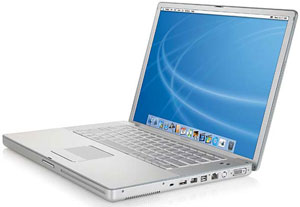
The 12” G4 Powerbook is regarded by many as being one of the best ever notebooks produced by Apple. Despite being replaced by the original plastic intel based MacBooks it still remained a highly sought after model long after it was discontinued. Many users preferred it’s aluminum casing to the cheaper looking plastic of the MacBook and because it had a smaller screen (12” vs the MacBook’s 13”) it was the ideal choice for users looking for an ultra portable Mac.

I owned the 1.33 GHz model and was very happy with its performance. It came installed with Mac OS X Panther, but thanks to 768 MB of RAM it also ran Mac OSX Tiger with ease.

The one aspect of the 12” PowerBook that I was a little disappointed by was the screen quality, it was a cheaper spec than the 15” & 17” models and as a result colours looked a little washed out. Thanks to a little app called SuperCal though I was able to improve the quality significantly, and if you're intending to use the PowerBook 12” with an external monitor you won’t have any problems.

One definite plus point is the battery life of these Macs, in general use you should get around 3hrs from a battery in good condition. Although MAC OS X Tiger would be recommended for most of the PowerBook 12" range, higher spec models such as the 1.33 GHz with maximum RAM should also be able to run MAC OS X Leopard at acceptable speeds.

View 12" PowerBook G4s for sale >

AddThis Social Bookmark Button

Apple eMac (education Mac)

November 11th, 2008 Paul Posted in All in ones, Desktops, PowerPC G4 | No Comments »

The Apple eMac

Apple launched the eMac (education Mac) back in 2002 for the education market. It was significantly cheaper and more durable than the iMac of the time which had just been redesigned with a radical new lampshade form, comprising of a flat lcd screen pivoted on a dome base.

In contrast to the new iMac the eMac had a similar design to the original imac, a much bulkier form based around a 17 inch crt screen. Obviously the crt was the main area where Apple was able to produce the eMac much cheaper than the iMac. But although the eMac looked very different to the iMac on the outside, on the inside the eMac had the same G4 processor and graphics as the iMac. Unsurprisingly many consumers caught on to the idea of having a G4 based Mac at a price that simply hadn’t been possible before, and thankfully Apple decided to bow to consumer interest and made the eMac available to everyone.

The eMac was only around for 3 years and the design remained the same in that time, the only exception being the 2 speakers, which in later models came fitted with grills. Presumably the grills were added to protect the speakers in educational settings. Aesthetically the eMac looked better without the grills and it’s also thought that the grills may have lessened the sound quality. I recall people removing the grills on the later models using bent paper clips, though it had to be done with extreme care, as to much force could easily snap the thin plastic.

The eMac 1.25 GHz was the first modern Mac that I owned, like many other people it was the price that had the biggest impact on my decision. Ironically it was bought from PC world as it was the only place around where you could buy Macs from. The 1.25 GHz was available with either a standard DVD-ROM/CD-RW combo drive or a (DVD-R/CD-RW) SuperDrive, as I didn’t need to burn DVDs I went for the combo model. Back then the price of that eMac was £550, and when you consider that the cheapest Mac you can buy at the time of writing this post costs £400 without a keyboard, mouse or screen the eMac has to be one of the best value for money Macs that Apple has ever produced.

Although I found the eMac to be a very stable and reliable Mac it did have a few minor flaws. The speakers are very poor, music sounds distorted and because they are located just under the screen, the speakers can cause a slight flickering effect on the display. Once you plug in external speakers those flaws disappear though. Another thing to be aware of is that the eMac has quite a noisy fan, I never really noticed it when I was using it as my main machine - it’s only after using newer Macs that it seems quite loud. I suspect that if I had to go back to using it for longer amount of time I’d get to used to the noise.

View eMacs for sale >

AddThis Social Bookmark Button

Apple iBook Clamshell

November 10th, 2008 Paul Posted in Notebooks, PowerPC G3 | No Comments »

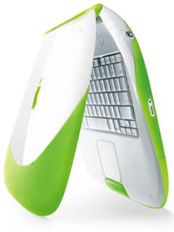
Key Lime iBook Clamshell

Apple launched the iBook Clamshell in 1999 as an affordable portable Mac for the consumer market. In contrast to the more understated design of Apple’s PowerBook range, the Clamshell’s design was a continuation of the radical all in one, curvy, multi coloured iMac. Many people loved the unusual design though some cruelly likened it to a toilet seat. Despite the detractors the Clamshell was hugely popular, no doubt some of it’s success came from it’s prolific placement in many movies of the time - it was instantly recognisable on screen and had a futuristic look that other laptops didn’t have.

The first two Clamshells were available in tangerine or blueberry colours, had PowerPC G3 300 MHz processors, and could be fitted with a then new AirPort wireless network card. With an AirPort card fitted the Clamshell could be used to browse the internet without the need for wires - one of the first mainstream laptops to have such a feature.

A Graphite Clamshell was launched less than a year later with a faster 366 MHz processor. This was followed by models featuring Firewire ports and improved graphics (6MB vs 4MB in the previous models). The new models were available in two new colours - indigo blue and key lime. The final Clamshells had 466 MHz processors 8MB of VRAM and DVD-ROM drives and they were available in Lime or Graphite.

Based purely on the iBook Clamshell’s unusual design I bought an indigo model off ebay a couple of years ago, and despite being 8 years old it still performs very well today. Thanks to a mixture of plastic and rubber casing these Macs are incredibly tough. Other innovative touches include a fold out carrying handle and a latch free opening and closing mechanism.

The later iBook Clamshells such as the indigo, key lime and graphite models can officially run Mac OS X Tiger, though even with maxed out RAM performance is poor, so it's best to opt for Mac OS X Panther. If you do still want to try Tiger on a Clamshell that doesn't have a DVD-ROM drive you will have to connect it to another Mac (that does have a DVD-ROM drive) and reboot the Clamshell in FireWire target disk mode (hold down T while it restarts). This will turn the Clamshell into an external hard drive on the other Mac from which you can then install Tiger.

View Clamshell iBooks for sale >

AddThis Social Bookmark Button

Apple PowerMac G5

November 10th, 2008 Paul Posted in Desktops, PowerMacs, PowerPC G5 | No Comments »

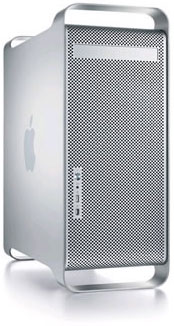
The Powermac G5
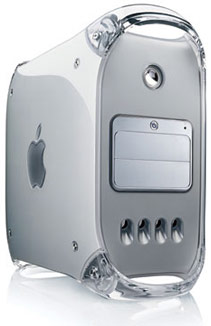
The Power Macintosh G5 was introduced by Apple in 2004 as a replacement to it’s hugely successful G4 range of PowerMacs. Not only did the G5 PowerMac offer greater processing power than the G4 range, it also saw Apple move away from the curvy, plastic cases that had been used for it’s pro range of desktops since the original blue and white PowerMac G3 of 1999.

Instead Apple introduced an anodized aluminum alloy case with a distinctive front grill - a design that is now somewhat cruelly referred to as being like a cheese grater. Despite this the ‘cheese grater’ case is still in use in the 2008 range of MacPros.

Although it was only around for 2 years, the PowerMac G5 range saw a number of revisions made to it’s processor, ranging from a single processor 1.6 GHz model through to the final 2.5 GHz Quad Core model - the most powerful of all Apple’s PowerPC based Macs.

My experience of using the PowerMac G5 has been positive, although it seems quite a bulky case it’s certainly not ugly. While it might not be able to keep up with the intel based PowerMacs it’s still a very capable machine and unlike previous PowerMacs it runs incredibly quiet.

All the PowerMac G5’s have easy to access internals making it relatively simple to add more RAM or bigger hard drives. Providing you have at least 2GB of RAM all of the G5 range should run Mac OS X Leopard with ease, later models (dual & quad cores) can be fitted with a massive 16GB of RAM!

View PowerMac G5s for sale >

AddThis Social Bookmark Button